
Product
BlackLake governs every AI action, including the long-running ones.
The control plane and the ledger for every consequential AI action: agents, automation, and AI-operated workflows. Use the hosted cloud, or install one npm package and run the SDK, CLI, workflow runtime, and shell wrapper locally.
AI control infrastructure
Route agents, automation, and durable workflows through BlackLake
Use Surface to approve, block, track spend, and prove consequential actions across agents, coding tools, CI, shell sessions, cloud automation, SDK calls, and existing workflow engines. Use Depth when you want durable TypeScript workflows that checkpoint each step. Both land in the same policy, cost, and receipt model.
AI actor
Tool or workflow
Agent · CLI · CI · service · durable workflow
Capture path
MCP · SDK · CI · blx · audit · Depth
Choose the route that fits
BlackLake
Surface control plane
Policy → approvals → spend → receipts
Execution
Customer-owned systems
GitHub · Cloudflare · Linear · Sentry · cloud · shell
Analytics
Signed receipt
Decision, cost, actor, policy, outcome
MCP is the fastest path for many coding tools. SDK, CI, shell, cloud audit ingest, existing workflow engines, and Depth use the same BlackLake model without forcing every team to adopt the same runtime.
Actors we govern
Different actors, idiomatic routes, one policy, cost, approval, analytics, and receipt layer.
CLI coding tools
Claude Code, Codex, Cursor, Aider, Goose
IDE assistants
Cursor, Windsurf, VS Code Copilot, JetBrains AI
CI / CD bots
GitHub Actions, Buildkite, GitLab CI
Backend services
Node and Python workers calling LLMs
Workflow runners
Temporal, Inngest, Trigger.dev, Cloud Run, ECS
Durable workflows
TypeScript workflows that checkpoint and resume
MCP services
Every tool call routed through policy
Human shell sessions
git push, terraform apply, gcloud run deploy
Scope
What BlackLake controls
BlackLake is explicit control infrastructure. It governs the paths you route through it and reconciles the audit trails you send to it; it does not pretend to invisibly intercept every process on a developer machine.
Does
- Controls MCP tool calls routed through the BlackLake gateway.
- Controls custom AI Actor and backend calls wrapped with the SDK.
- Gates CI/CD jobs through the GitHub Action.
- Gates shell commands launched through blx.
- Reconciles cloud and audit events that bypassed active control.
Does not
- Silently intercept direct provider calls that bypass BlackLake.
- Replace identity provider permissions or cloud IAM.
- Guarantee third-party MCP server behavior.
- Turn unpriced model calls into reliable spend data.
- Remove the need to choose which actions need approval.
Capture
One ledger for every AI action
Whether the actor is a Claude MCP call, a Cursor deploy, a backend agent you built, an AI-triggered CI job, or a teammate using AI to operate production: same capture, same ledger, same policy engine.
Every AI action
Claude · Cursor · CI · shell · workflows
BlackLake
Target systems
MCP · GitHub · cloud · DBs · APIs
Govern in action
Five views, one ledger
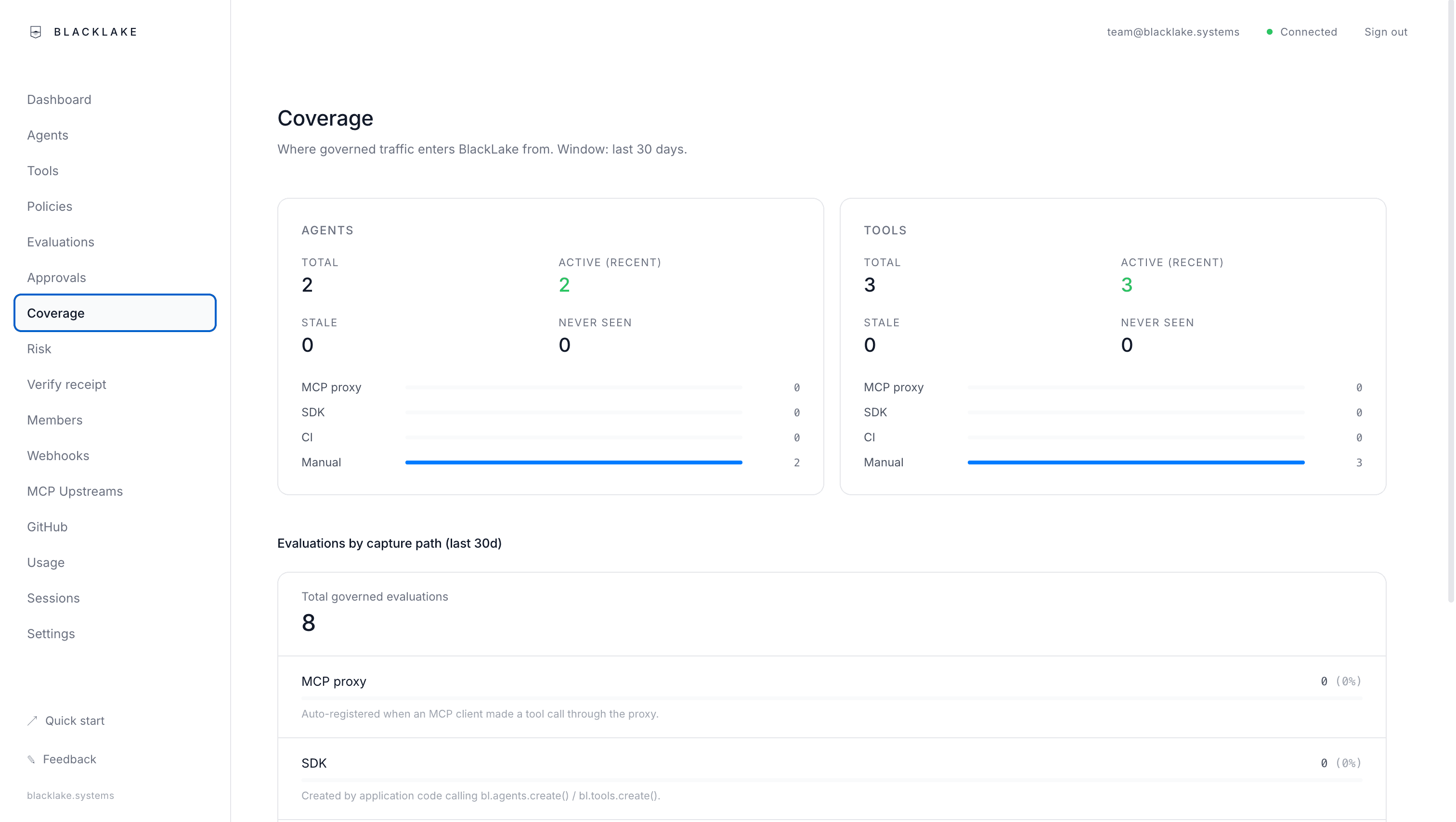
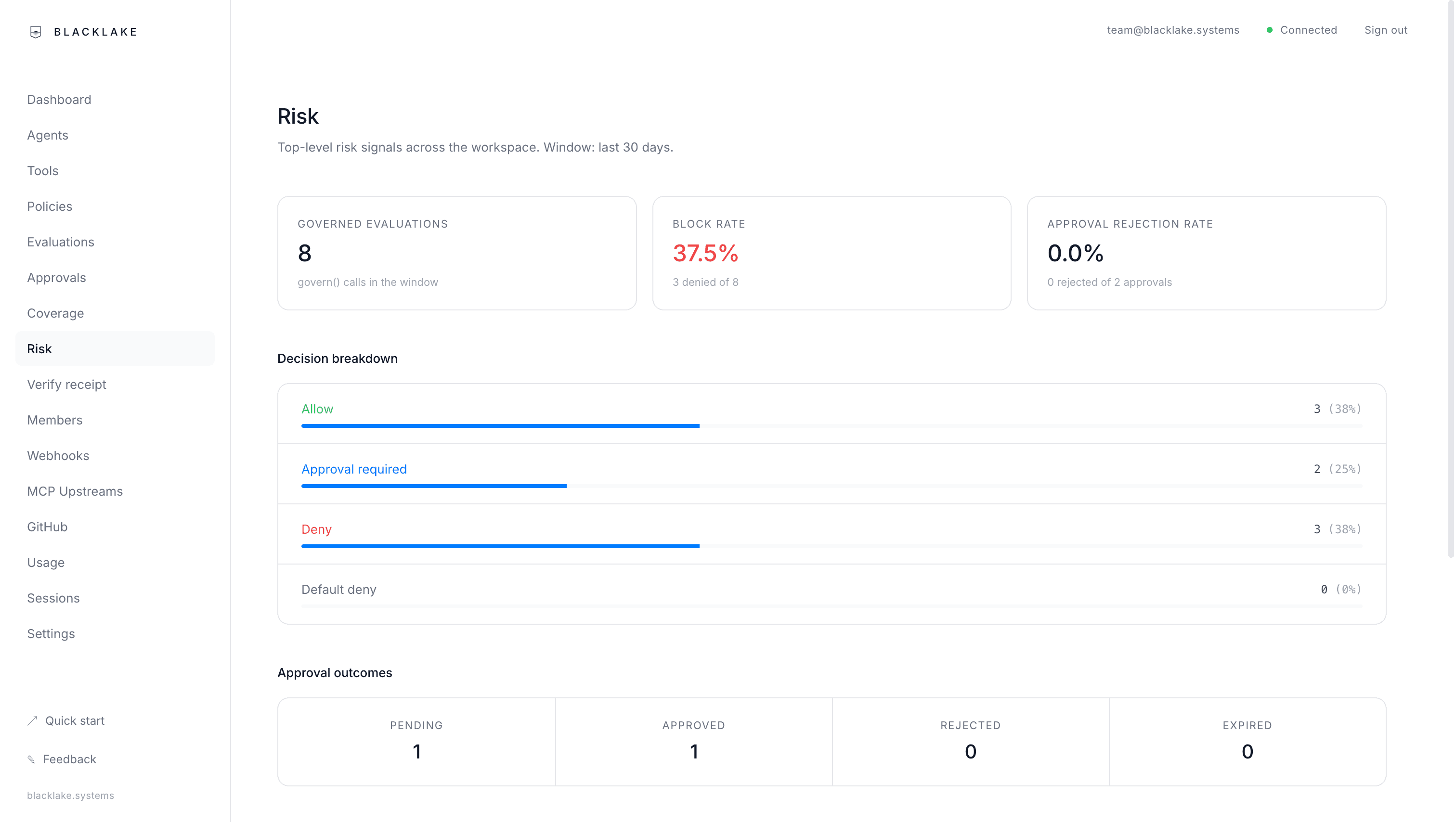
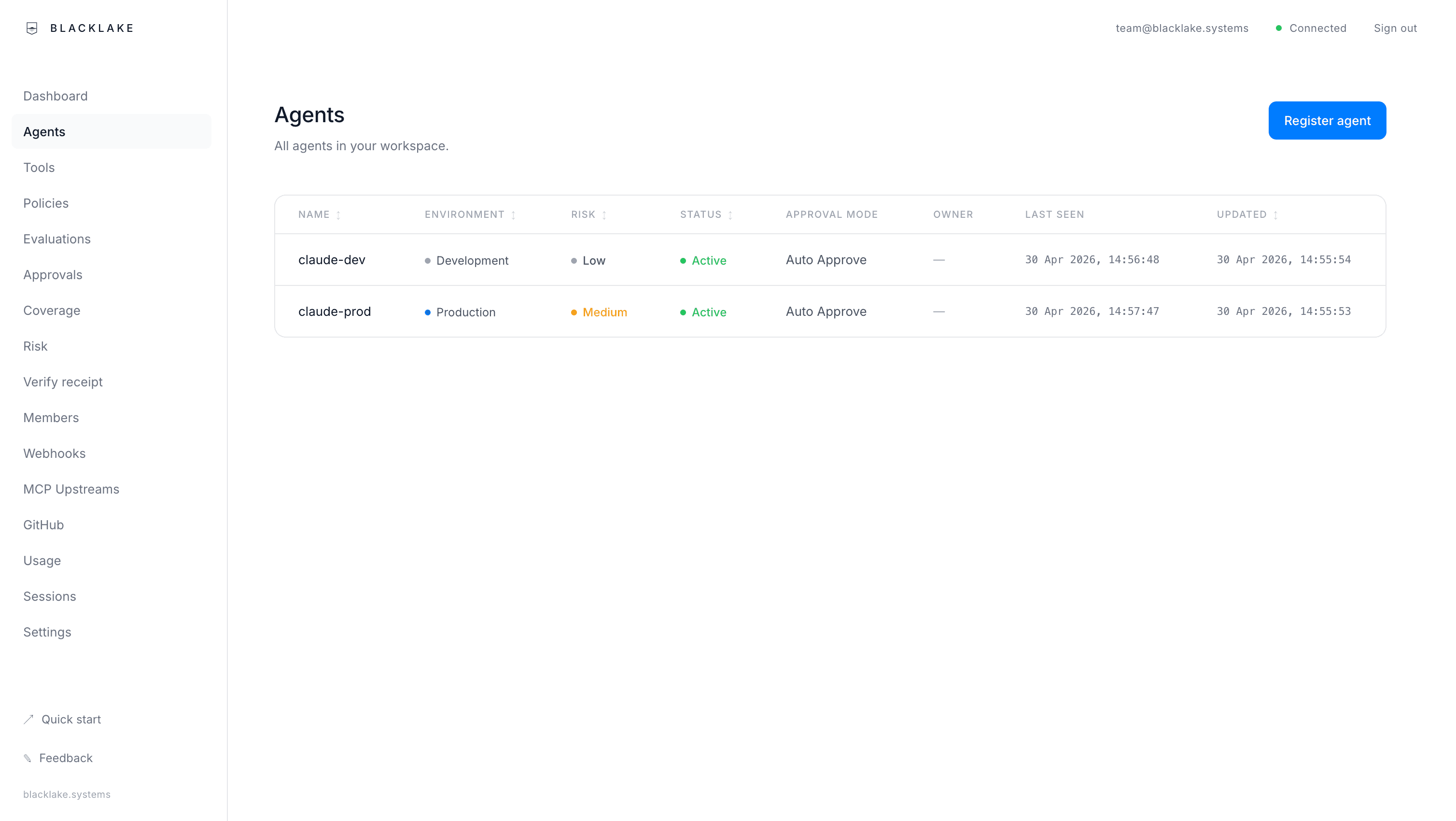
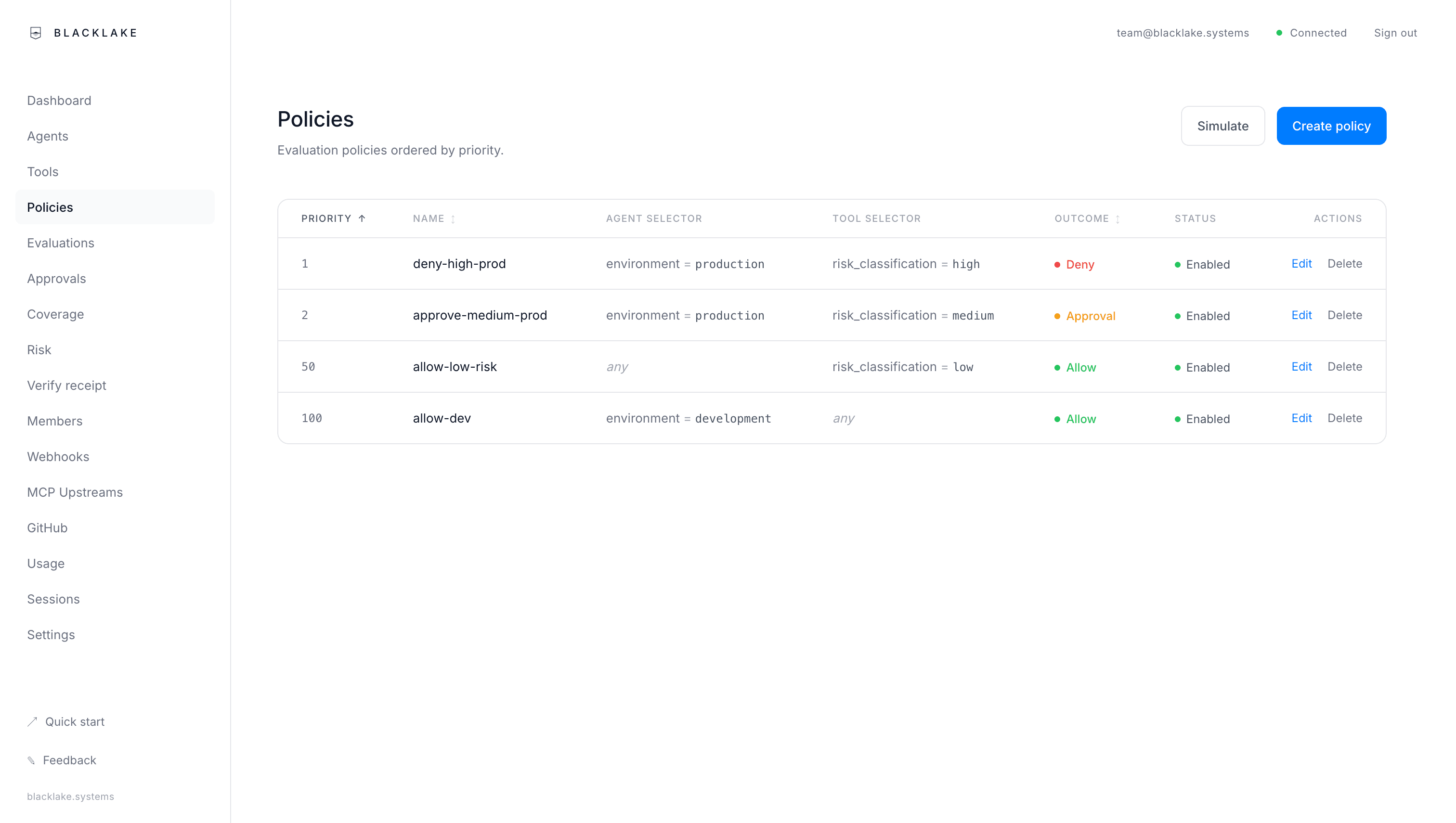
Coverage tells you what's governed and what isn't. Risk surfaces the actors slipping through. AI Actors and tools track every actor that's ever called BlackLake. Policies are the rules; approvals are humans deciding the edge cases.
Capabilities
What you get
Policy engine
Declarative allow / deny / require-approval rules per actor. Two-person approval and break-glass for the highest-risk gates.
Signed receipts
Every decision is HMAC-signed and binds the policy snapshot, approvers, outcome, and cost. Verifiable independently: receipts can't be faked.
Coverage dashboard
Which actors are governed, where each enters from, where the blind spots are.
Risk view
Top denied actors, high-risk tools, approval rejection rate, recent denied actions. The page operators open before standup.
Policy simulation
Replay weeks of history against a draft policy. Decision shifts and dollar impact in one view: ship gates with evidence.
Audit export
Stream evaluations + approvals + receipts as NDJSON to BigQuery, an SIEM, or a customer-assurance pack.
Eight capture paths
MCP proxy, SDK govern(), CI / GitHub Action, blx shell wrapper, cloud audit ingest (GCP / AWS / Azure / GitHub), existing workflow engines (n8n / Zapier / Airflow), Depth durable workflows, and console-registered manual actors. One ledger end to end.
Approvals everywhere
Console, email magic-link, or mobile push. Webhooks for downstream systems. Two-person where it matters.
Cost governance
Per-call cost across Anthropic, OpenAI, Vertex, Bedrock, Foundry, Gemini, and Ollama: bound into every receipt. Budgets deny before the spend.
Capture
Wherever AI actions originate
BlackLake captures AI actions wherever they originate: your IDE, your CI, your shell, your cloud, your code. Each path produces the same evaluation record on the ledger. Most workspaces use several.
MCP Proxy
For Cursor, Windsurf, Claude Desktop, Claude Code, Cline, Continue, and any other MCP client.
Point your MCP client at https://api.blacklake.systems/mcp/u/<name> with a user-scoped API key. Every tool call runs through governance, records a signed receipt, and is attributed to the calling user. Upstream auth handled in two modes: auto (RFC 7591 dynamic client registration for Atlassian, Linear, Cloudflare, Sentry, Notion) or manual (paste a client_id for Google, Microsoft, AWS, Slack, GitHub, custom). Run npx blacklake serve for the same flow on your laptop.
MCP configuration
// ~/.blacklake/mcp-config.json{ "servers": { "filesystem": { "command": "npx", "args": ["-y", "@modelcontextprotocol/server-filesystem", "."], "policy": "ask" } }}TypeScript SDK
For application code and custom AI Actors.
Wrap any consequential operation in govern() for policy evaluation, approval routing, and audit logging. The decision returns a signed receipt token you can quote downstream.
SDK integration
import { govern } from 'blacklake';const decision = await govern({ apiKey: process.env.BLACKLAKE_API_KEY, agent: 'expense-bot', tool: 'stripe.refund', action: { amount: 4200 },});if (decision.decision === 'allow') { await stripe.refunds.create({ amount: 4200 });}GitHub Action
Drop one step into a workflow. The action calls govern() with auto-collected GitHub context, blocks on approval-required, and ties the deploy outcome to the receipt.
blx wrapper
blx git push, blx terraform apply, blx gcloud run deploy. Classifies the command, governs it, runs it, and records the exit code.
Cloud audit ingest
Forward GCP / AWS / GitHub audit events. Reconciliation matches them against the evaluation log; the unmatched set surfaces production mutations that bypassed every governed path.
npx blacklake serveDepth
AI workflows that resume from the last completed step
Write workflows as TypeScript functions, checkpoint each step, resume from the last one on crash. Each consequential step routes through the same policy, approval, budget, and receipt model as any other BlackLake action.
Step-based execution
Write workflows as TypeScript async functions. Each step persists to disk.
Crash recovery
If the process dies, re-run the file. Completed steps replay from SQLite instantly.
LLM routing
Call Anthropic, OpenAI, or Ollama with one API. Bring your own credentials.
Surface integration
Tool calls go through Surface's governance. Costs show in Surface's dashboard.
Typed errors
ToolDeniedError, ToolNotFoundError, SurfaceUnavailableError, not generic catches.
Local executors
Register fallback implementations for when Surface isn't running.
Durable workflow
import { workflow, step } from 'blacklake';export default workflow('research', async (ctx) => { const data = await step(ctx, 'gather', async () => { return await ctx.llm('anthropic:claude-sonnet-4-6', { prompt: 'Find recent papers on AI governance', }); }); await step(ctx, 'save', async () => { await ctx.tool('filesystem.writeFile', { path: './report.md', content: data, }); });});npx blacklake run workflow.tsDeployment
Run your AI control plane from the cloud.
Try it locally first if you'd rather see it on your machine before a team rollout. Same policy, cost, and receipt model: move to the hosted console when approvals, shared policies, budgets, and exports matter.
Cloud
Sign up at console.blacklake.systems. Free while in beta.
- Up in seconds, nothing to install
- Persistent history across machines and restarts
- Team visibility across multiple developers
- Access and approvals from any device, including mobile
- Cloud audit ingest from GCP, AWS, GitHub
Local
One command on your machine. Fast first run, private by default.
- Runs locally with SQLite, no external dependencies
- Policy engine, approvals, audit log, cost tracking
- MCP proxy, transparent governance, no code changes
- Depth workflows with full crash recovery under Surface governance
npx blacklake serveCompare
See how BlackLake compares
AI governance platforms
Governance decides allow or deny. BlackLake also costs the call and proves the decision with a signed receipt.
AI observability (LangSmith, Langfuse)
Observability watches and traces. BlackLake decides, denies, approves, and proves before the action runs.
Audit logging / SIEM-as-AI-audit
A log records what already happened. BlackLake can deny a call before it happens.
Cost-tracking tools
Most tools report what AI cost after the fact. BlackLake controls what it's allowed to spend.
Cloud FinOps tools
FinOps stops at the API call. BlackLake attributes every token to the AI Actor that spent it.
Run your AI control plane on BlackLake.
Approve, block, track spend, and prove every consequential AI action, including the long-running ones.